No spending recorded this period yet.
Dashboard
How fast money is leaving this period.
Spent of cap · tick = time elapsed — Cashflow
No active budgets — create one on Cashflow.
Left now vs what you started with · tick = even pace
No checking, savings, or cash balances yet — add one on Accounting.
Realized trading gains vs spending by month
Trade journal
Plan, record, and review every trade.
Realized P&L by the day each trade closed (New York trading day). Click a day to see its trades. The filters above apply, except From/Through — the month sets the dates. Agentic rebalances are left out.
Every closed trade. Use the filters above to narrow it down.
Equity curve cumulative realized P&L by close date
Your setups and their rules. Tag a trade with one under Plan. Editing playbooks comes in phase 4.
Stage legs, review metrics, send trade.
High-risk sleeve book from typed Barchart figures (spot, net GEX $B, put/call walls, ATM IV %, IVP). GEX picks side; IV and IVP pick size. Live tickets are sized here — not from the GEX scan. Open the seven-name basket once; flatten at 3:30. Playbook in .prompt.
Sleeve rules
Meter
ĝ = tanh(GEX $B / 2). v = tanh(ATM IV% / 20). p = IVP 0–100.
Sell (GEX ≥ 0): m = |ĝ| × (50 + p/2) / 100 × (0.5 + 0.5 v)
Buy (GEX < 0): m = |ĝ| × p/100 × v × (0.25 + 0.75·geo)
geo = min(1, daily implied move / cage width); 1 if cage unknown. Blank IV → 15%, blank IVP → 50.
No 0.25 sit-out. Skip a name only when m = 0 or budget cannot fund one contract.
Basket
SPY, QQQ, IWM, GLD, SLV, TLT, IBIT. Weight wi = mi / Σ m. Budget = o(a) × wi. Open once, 3:30 flat, no recycle. Round-trip cap ≥ 7. Equity cluster (SPY/QQQ/IWM) capped at half of deployed weight.
Mixed GEX is the hedge
Pin (SPY, QQQ, IWM, TLT, GLD): sell when +GEX, sit out when −GEX — never a buy. Expansion (IBIT, SLV): buy when −GEX, never short. h = expansion-long budget / pin-short budget. If h = 0 you are running an unhedged pin book — the book already sizes pin shorts at half of o(a). Do not add noisy shorts. TLT/gold are not crash hedges in the 2024–2026 sample. Daily cap d(a)/2 is the wipeout brake.
Scan mix
- Equity +GEX, IBIT/SLV −GEX and IVP alive — the setup. Size longs so they can offset pin max loss.
- Everything +GEX — no hedge. Short pin names only (or sit noisy names out).
- Everything −GEX — long-vol basket. Sit pin names out; IBIT/SLV carry.
- Equity −GEX, IBIT +GEX — skip the IBIT short (wrong way around).
0DTE structure
Pin +GEX: sell iron condor (inside) or snap-back credit (outside). Expansion −GEX: buy reverse iron condor. Pin −GEX and expansion +GEX: skip. GEX flip trails only on the matching role. $1 width default. Fill ~$0.30.
One iron condor from IV and IV percentile. IV sets the ±1σ short strikes to expiry. IVP picks the side — below 50 sell the condor, 50 and up buy it — and scales size. Realized vol and the condor's own price decide whether this one is worth taking.
Volume & OI
Total call + put volume and open interest for each expiration within Max DTE (same window as GEX advisory). Avg ATM IV is the mean call/put IV at the strike nearest spot, on the right-hand % axis.
IV by strike
Live call and put implied volatility for each strike of the selected expiration; the dashed line is spot. Strikes with no bid, zero IV, or a one-strike spike are left out. Refreshes every minute while this tab is open.
Condor rules
Strikes
t = days to 4:15 PM ET on expiration. width = spot × IV × √(t / 365) — the 1σ move.
Body strikes at spot ± width (snapped outward to listed strikes). Wings one wing width beyond. Sell them when IVP < 50; buy them when IVP ≥ 50.
Side & size
From scripts/condor_setup.py: conv = IVP − 0.5 (IVP as 0–1). Below 0 sell the condor; 0 and up buy it. Conviction % = |conv| × 200.
risk = account / (1 − |conv|). contracts = round(risk × 0.5 / (wing width × 100)) with sign from the side — nearest rounding, same unit long or short.
Pricing gate
IVP picks the side; the condor's live price says whether this one is worth it. Sell only when the credit is at least 30% of the wing width (30/70). Buy only when the debit is at most 30% (70/30).
Bad pricing is usually just bad pricing — pass or change width or expiry rather than flipping sides.
VRP (IV vs realized)
Script: VRP = IV / HV. The cards also label fat (≥ 1.1×) vs thin and whether that agrees with the IVP side — VRP never flips the side.
- Fat VRP, low IVP — fear markup in calm; the usual short harvest.
- Thin VRP, high IVP — underlying-led vol; selective long.
- Fat VRP, high IVP — crisis and expensive insurance; longs pay up.
- Thin VRP, low IVP — calm and cheap; thin premium to sell.
Per-name tickets from a chain scan. Live sleeve sizing is typed Barchart numbers on Trade advisory.
IV, GEX & OI surfaces
3D IV, dealer-style GEX, and open-interest surfaces from a saved GEX scan (Redis on prod, data/gex locally). Uses the Max DTE and strike band above. Archives older than 30 days are removed automatically. GEX Z-axis is in $B (same BS gamma + OI convention as advisory). OI is contract count at each strike/DTE (call+put summed on avg).
Put credit spread
Steps through each session close in the market store: sells the put nearest the target delta in the DTE window, buys the listed put about one width lower, and manages it with take-profit, stop and DTE exits. Prices come from real quotes when stored, otherwise Black-Scholes (labeled).
Run history
GEX sleeve replay
Replay archived GEX scans through the live ticket rules and session exits. Run GEX advisory first so mornings land in Redis (prod) or data/gex (local).
Market data coverage
Every chain, spot, and GEX scan is saved for future backtests, plus a watchlist snapshot every 15 minutes during market hours.
Payoff vs underlying price from now through expiration. Spot and option marks update automatically. Drag the price line on the chart (or use the Price slider) to see P&L at another price.
NowExpiration
Stable vs high-risk sleeve split from the portfolio script in .prompt. Use total account value a and option premium per share e for contract count.
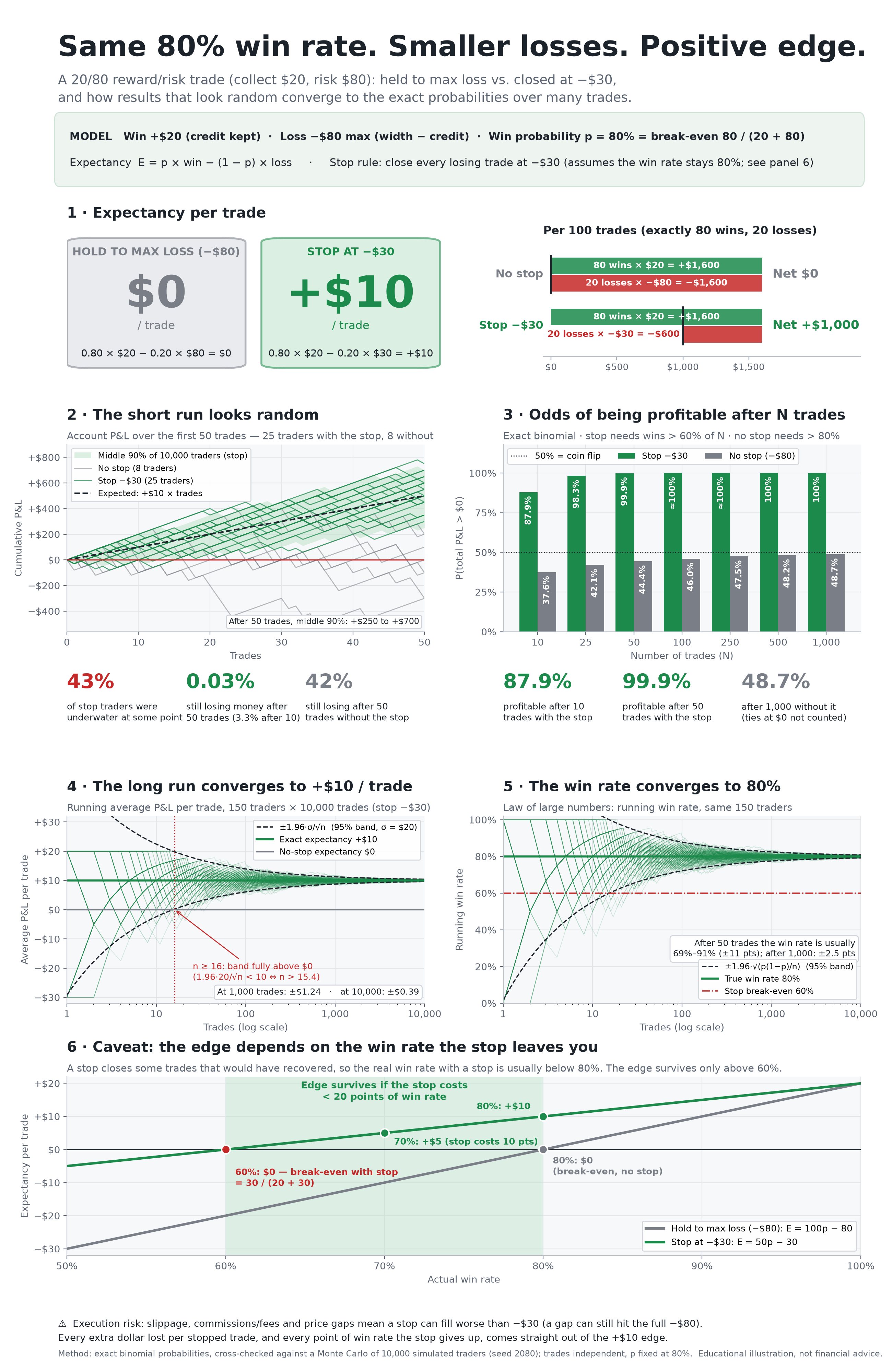
Your edge is what you make per trade on average, not how often you win. A trade that collects $20 and risks $80 needs an 80% win rate just to break even; closing losers at −$30 turns the same 80% into +$10 a trade.
Ten trades can look like luck either way. Over hundreds of trades the results converge on the math — so size for the short-run swings and judge the plan on the long run.
Key takeaways
- Expectancy per trade E = p × reward − (1 − p) × loss. At 80% wins: 0.8 × $20 − 0.2 × $80 = $0 held to max loss; 0.8 × $20 − 0.2 × $30 = +$10 with a −$30 stop.
- Per 100 trades (80 wins, 20 losses): +$1,600 − $1,600 = $0 without the stop; +$1,600 − $600 = +$1,000 with it.
- Break-even win rate = loss ÷ (reward + loss): 80% held to max loss, 60% with the stop.
- The short run looks random. With the stop you are profitable 87.9% of the time after 10 trades and 99.9% after 50 — yet 43% of traders were underwater at some point in their first 50. Without it: 37.6% after 10, still only 48.7% after 1,000.
- The long run converges. The running average heads to +$10 a trade and the win rate to 80% (law of large numbers).
- Caveats. A stop closes some trades that would have recovered, so the real win rate is usually below 80% — the edge survives only while it stays above 60%. Slippage, fees, and price gaps mean a stop can fill worse than −$30; a gap can still hit the full −$80.
Try your own numbers
Exact binomial odds; trades independent with a fixed win rate. Real fills, fees, and streaks differ.
Not advice. Educational illustration only — not financial, tax, or legal advice. Options involve substantial risk; past or simulated results don't guarantee future results.
Brokerage accounts
Brokerage accounts used by Trades. Balances combine cash movements with trade activity and still roll into the Dashboard and Planning → Overview.
Robinhood opened in a new tab. Log in and click Allow. Robinhood then shows a “This site can’t be reached” page — that’s expected. Copy that page’s full address from the address bar and paste it here.
Tab didn’t open? Open Robinhood sign-in
Deposits, withdrawals, transfers, and spending for the selected account. Trade fills and realized P&L are recorded automatically from Trades and are not listed here.
Investments
Businesses, real estate, and project capital — what went in, what it's worth, and how it's growing.
Insurance
Life, property, and business coverage — what's covered, what it costs, and when it renews.
Leverage
Credit cards, loans, and lines of credit — track balances, rates, and repayment schedules.
Accounting
Your daily ledger — accounts and transactions. Flow type is where money went; budget category is how you track spending against a budget.
Cashflow
Budgets, categories, and spending discipline. Each budget picks funding accounts and a cap per account; categories split that budget's dollar cap.
Charity
Tithe, individuals, and organizations — who you give to and how much.
Taxes
Realized trading gains by holding period, your IRS rates, and what you actually paid each year.
Legal
Trusts, wills, and estate structure.
Feedback
Tell us how Bilanx is working for you — a kind word, something missing, an idea, or something broken.
Planning
Family meetings, CFO snapshot, and qualitative capital.
In this household
Where you stand
Updating…
Family CFO snapshot every number vs the prior month
Net worth
—
The trend appears after a second month of ledger history.
Cash cushion
—
Details large expenses in the next 90 days
Monthly plan
—
No recurring lines yet — add them on Cashflow.
Details pay period plan
Recurring cashflow normalized to your anchor pay period. Manage lines on Cashflow.
Plan vs actual
—
No plan or ledger activity this month.
Details plan vs ledger
Ledger expenses (expense) vs discretionary spending (spending) compared to the recurring plan scaled to a calendar month.
Where the money went
—
No categorized bills or spending this month.
Details by category
Red means spending increased; green means it decreased. Stronger color indicates a larger dollar change among these categories.
Savings by category
Budget pace
—
Details budget pace
Savings goals
—
Details goal progress
Goal progress uses savings transactions tagged to each goal budget.
Debt paydown
—
No debt instruments — add one on Leverage.
Details leverage
Debt instruments and optional roll into Cashflow recurring expenses. Manage on Leverage.
Meeting follow-through
—
No agenda action items or grocery list yet.